

Greetings, Winston-Salem Members!
Welcome to Your System Conversion
START PAGE
Effective Monday, November 2, 2026
The information on this page is designed to help Winston-Salem Credit Union members make the transition to Self-Help's products and services.
You may access any other page of the Self-Help website from this page. Please note that from now on, any attempt to access the Winston-Salem Credit Union website (mywsfcu.org) will redirect to this page.
Conversion weekend: Oct. 30 - Nov. 2
Digital services access: Starts Nov. 2
Jump to a section


Online Banking
Click the yellow Login button at the top right of this website.
Then click the Login button below the NC, SC, FL, GA, or VA list of states.
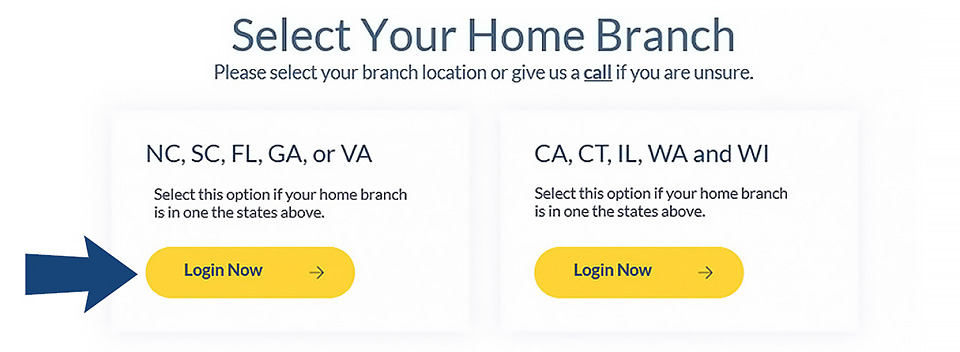
Username and password requirements for Existing mywsfcu.org online banking users
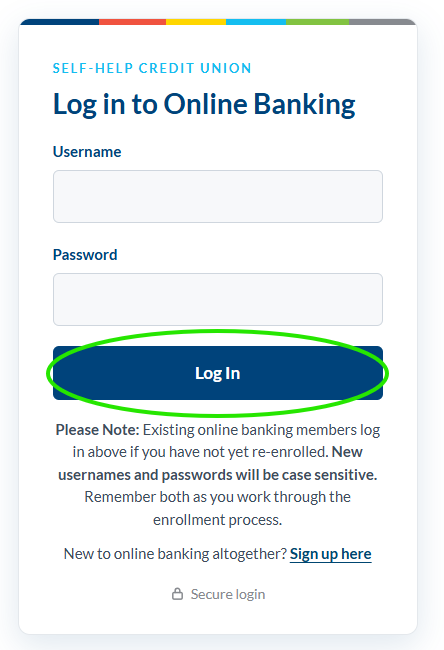
Username field: Enter your current mywsfcu.org online banking Logon ID.
Password field: Enter your current mywsfcu.org online banking Security Code.
Click the Log in button.
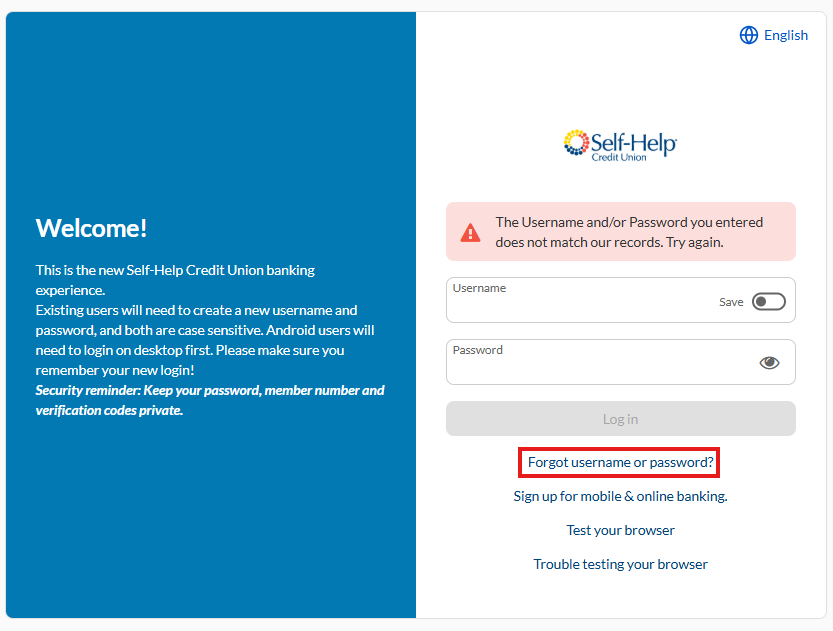
IMPORTANT:
- DO NOT click the Forgot username or password text link, which will appear on a second login screen if you enter an unverified Login ID and/or Security Code.
- If you've forgotten your Winston-Salem CU online banking username or password, then do not proceed. Instead, visit the branch for assistance, or call Self-Help CU's member service contact center at 800-966-7353, and select option 3, to continue with your first-time login.
Username and password requirements for New online banking users
- Click the Sign up text link.
- Complete the registration form. Use your new 8-digit Self-Help CU member number.
- Accept the terms and conditions.
- Click the Complete Sign Up button.
Verification: Follow the on-screen instructions.
How to construct your new member number:
- Determine if your Winston-Salem CU member number is a 2-, 3-, 4-, 5-, or 6-digit number.
- Select the template with the same number of blanks as the number of digits in your current Winston-Salem CU member number.
- Fill in the blanks with your current Winston-Salem CU member number to create your new 8-digit member number.
For your information
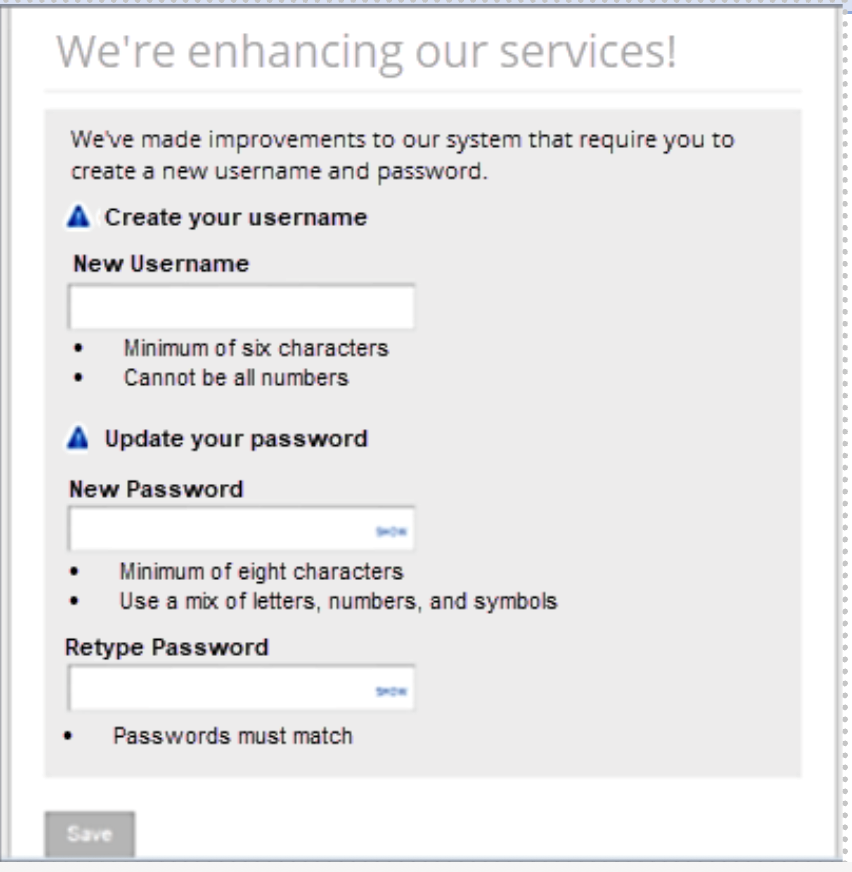
You may need to change your username in addition to creating your permanent password.
This applies to both existing mywsfcu.org users and new online banking users.
Enrollment Authentication
- Follow the on-screen instructions.
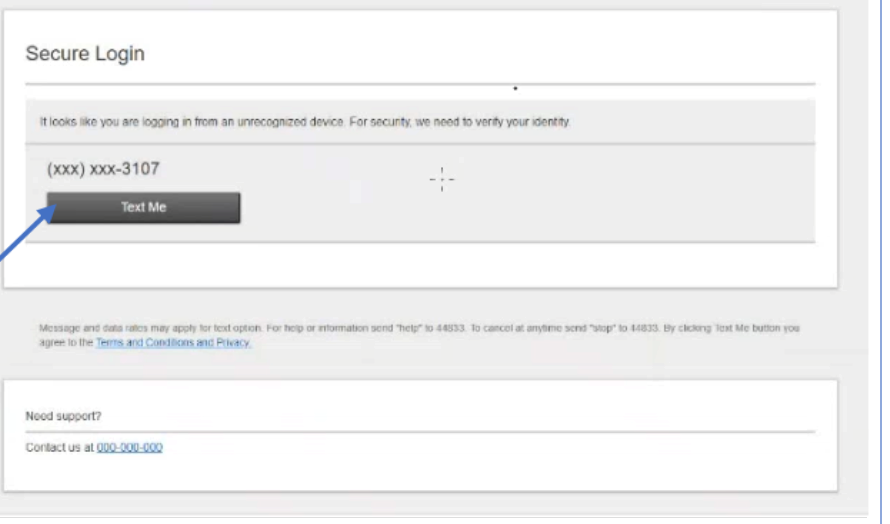
- A one-time passcode will be generated and sent to you by text, email, or another verifiable method.
- If your contact information can't be verified by the system, you won't receive the passcode. Call the Winston-Salem branch or Self-Help member support to complete enrollment.
Shared login credentials (online and mobile)
Self-Help's online banking and mobile banking use the same login credentials. The username and password you create for one will also give you access to the other.
Mobile Banking
Self-Help's mobile banking app features include:
- Mobile Bill Pay
- Mobile check deposit
- Funds transfer
- Account transaction activity alerts
- Branch and ATM locator
- Open your device's app store.
- Search for Self-Help Credit Union.
- Download the app with the blue Self-Help icon (not the orange Self-Help FCU app).
When using the Self-Help mobile app, follow the first-time login instructions shown above for online banking.
Existing users tap Login. New users tap Sign Up.
IMPORTANT:
- DO NOT click the Forgot username or password text link, which will appear on a second login screen if you enter an unverified Login ID and/or Security Code.
- If you've forgotten your Winston-Salem CU online banking username or password, then do not proceed. Instead, visit the branch for assistance, or call Self-Help CU's member service contact center at 800-966-7353, and select option 3, to continue with your first-time login.
Read more about Self-Help's mobile banking
About the Winston-Salem FCU mobile banking app: We recommend you delete the WSFCU app from your device(s) after it is deactivated.
Bill Pay
You may begin using Self-Help Bill Pay anytime on or after Monday, November 2, 2026. If you are an existing Bill Pay user, your current payees and schedules will be transferred to the Self-Help Bill Pay platform.
Audio Banking
Call at any time from anywhere to check account balances, monitor account activity, request a withdrawal by check, transfer funds, make loan payments, and more.
- Dial 866-708-0694 to access the service.
- Enter the primary member's new member number.
- Enter the last four digits of the primary member's SSN, ITIN, or EIN as the PIN.
- Follow the audio commands.
Statements
Delivery
- In early November, a printed statement will be mailed to you through the U.S. Postal Service with all Winston-Salem CU account activity since your last statement.
- This will be your final Winston-Salem CU account statement.
- No e-statements will be issued at that time.
- You will receive the early November statement whether your account's statement cycle is usually monthly or quarterly.
- Future statements will be issued at the usual monthly or quarterly interval and will show the Self-Help name and account numbers.
E-Statements
- Use Self-Help online banking to access the new e-statement platform on or after Monday, November 2.
- Enrollment may be required the first time you access the platform.
- Later this year, about one year of your Winston-Salem CU statement history will be available through the Self-Help e-statement platform.
Prior Member Mailings
View copies of the system conversion announcements mailed to Winston-Salem CU members in August, September, and October. These mailings include:
- New member number information
- Online banking login information
- Member service contact information
Username and Password: First-Time Users of Online Banking
View the past system conversion announcement with login information for:
- New users
- mywsfcu.org online banking users
Cards
- Replacement debit and ATM cards can be used on or after Monday, November 2, 2026.
- If you'd like a debit card for your Self-Help checking account, contact us after Monday, November 2, to order a new card.
Credit Cards: Available Starting November 2, 2026
- You may apply for a Self-Help credit card anytime on or after Monday, November 2, 2026.
Help
Self-Help CU member service contact center